

Most download problems come from a small number of causes. Work through this list from top to bottom; the first three solve the majority of cases.
1. Check that the video is public
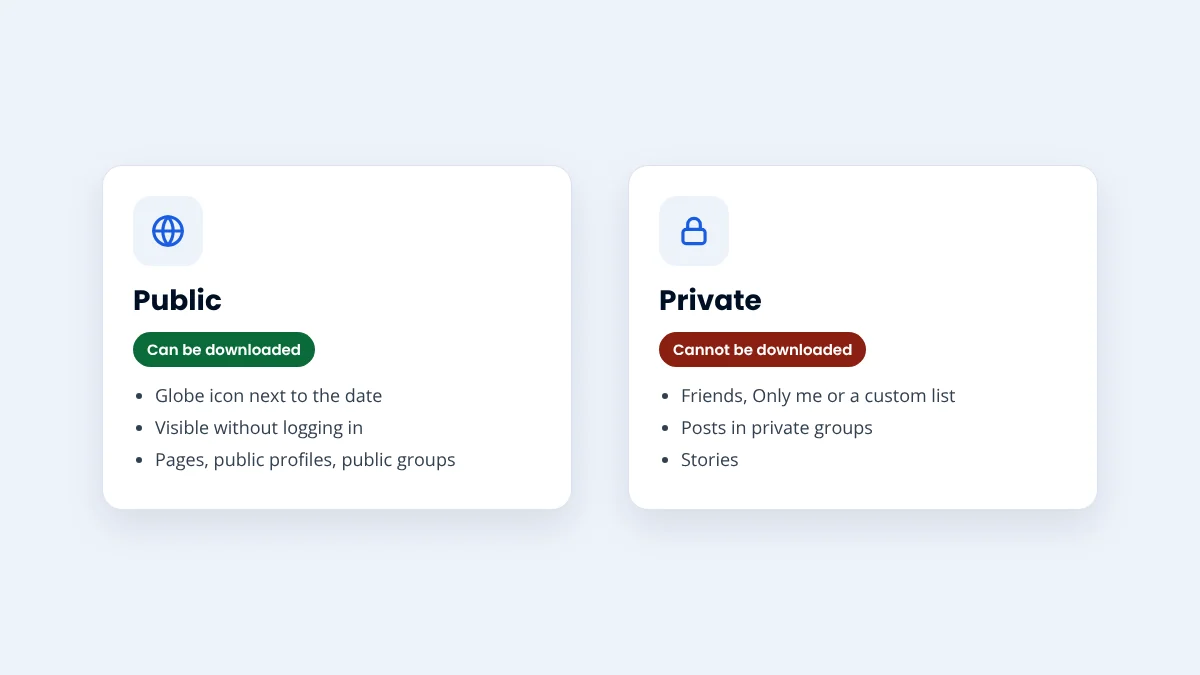
Online downloaders only reach public videos. Open the post and look for the globe icon near the date. Friends-only posts, private group posts and stories will not work. See can you download private Facebook videos.
2. Copy the link again
Links get cut off when copied by hand. Use Share, then Copy link rather than selecting text. Our guide to copying Facebook video links shows each method.
3. Make sure it is a video link
A link to a profile, a photo or a text post has no video to find. Open the video itself before copying.
4. Wait and try once more
Looking up a video takes around five seconds. If the service is busy you will see a message saying so. Wait a minute and try again.
5. Try the other quality
If one button fails, try the other. New uploads sometimes have only one version ready.
6. Check your connection
Large files fail on unstable connections. Switch to Wi-Fi for long videos.
7. Free up storage
A download that stops near the end often means the device is full.
8. Try another browser
Ad blockers, privacy extensions and in-app browsers can interfere. Open SaveFBVid directly in Chrome, Safari, Firefox or Edge instead of inside the Facebook or Messenger app.
9. The video may be gone
If the owner deleted the video or changed its audience, the link stops working everywhere.
Still stuck?
- The video plays but does not download: use the player's three-dot menu and choose Download, or right-click and choose Save video as.
- You cannot find the file: check the Downloads folder; on iPhone look in the Files app.
If none of this helps, the video is very likely not public.
Releated Posts
 How to Save Facebook Videos to Your Camera Roll or Gallery
 How to Download Your Own Facebook Videos (Full Backup)
 How to Download Facebook Live Videos After the Stream Ends
Comments
No comments yet.
Leave a Comment
Your email address will not be published.