
Facebook Live streams often turn into regular videos when they end. Once a replay is available and public, you can download it like any other Facebook video.
Can you download a stream while it is live?
Not with an online downloader. While a stream is running there is no finished file to save. Wait until the broadcast ends and the replay appears on the page or profile.
How to download a live replay
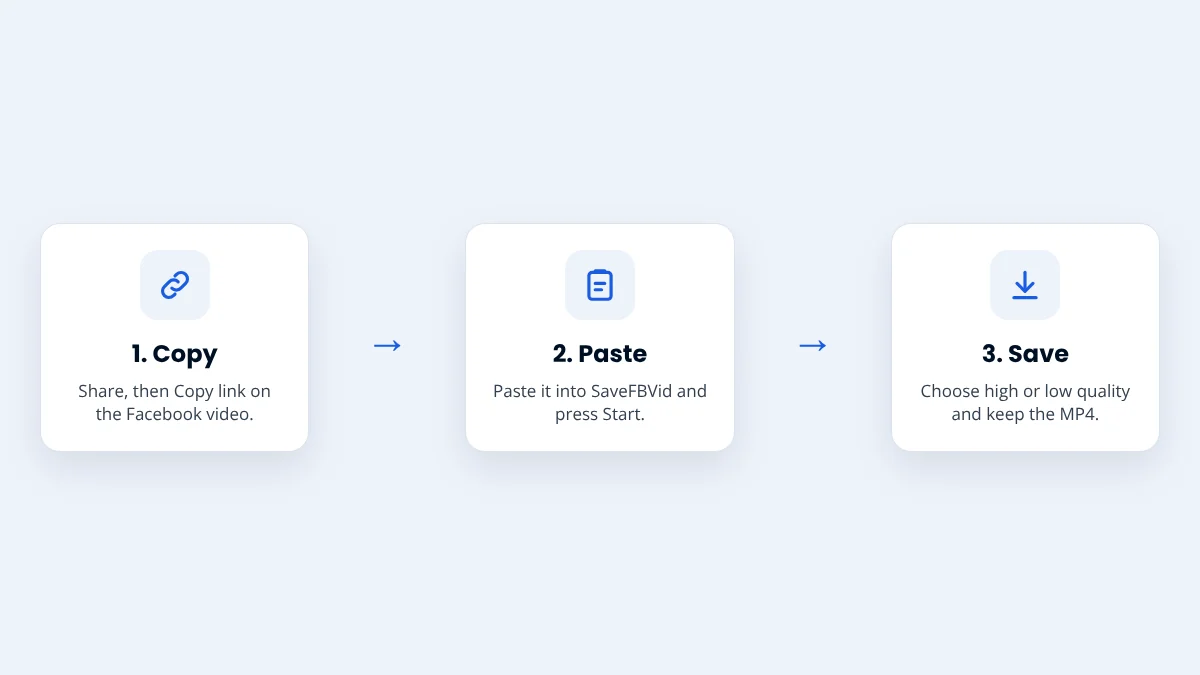
- Open the replay on Facebook.
- Choose Share, then Copy link.
- Paste the link into SaveFBVid and press Start.
- Pick high or low quality and save the file.
Long streams produce large files. Use Wi-Fi and make sure you have enough storage.
Why some replays cannot be downloaded
- The broadcaster deleted the replay or chose not to keep it.
- The stream was shared with a limited audience.
- It was streamed in a private group.
- The replay is still being processed. Try again a little later.
Downloading your own live videos
If you were the broadcaster, you have better options:
- Open the live video on your page or profile.
- Open the three-dot menu on the post.
- Look for Download video.
You can also export all your videos at once; see download your own Facebook videos.
Quality of live replays
A live video is recorded at whatever quality reached Facebook during the stream. If the connection dropped, the replay will show it. There may be no HD version at all; we explain why in HD vs SD.
Good practice
Live streams often include other people: guests, audiences, commenters. If you plan to share a replay outside Facebook, ask the broadcaster first.
Releated Posts
 Facebook Video Download: HD vs SD, and Which to Choose
 How to Download Facebook Videos on PC and Mac
 How to Download Facebook Videos on Android
Comments
No comments yet.
Leave a Comment
Your email address will not be published.